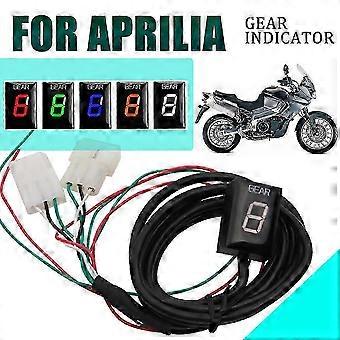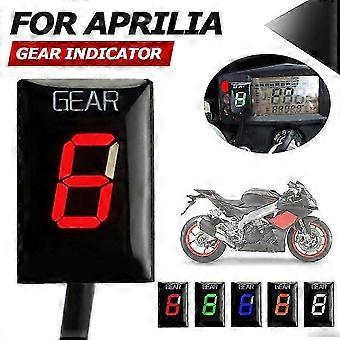
Gear Indicator For Aprilia ETV 1000 RS 125 RS125 RSV Mille Tuono RSV4 Non-ABS ETV1000 4 Caponord

CHF 33.95
+ CHF 11.49 Versand

Gear Indicator For Aprilia ETV 1000 RS 125 RS125 RSV Mille Tuono RSV4 Non-ABS ETV1000 4 Caponord

  • Marke: Unbranded
Verkauft von:

Gear Indicator For Aprilia ETV 1000 RS 125 RS125 RSV Mille Tuono RSV4 Non-ABS ETV1000 4 Caponord

  • Marke: Unbranded

CHF 33.95

Bespaar CHF 70.05 (67%)

UVP

CHF 104.00
Auf Lager
+ CHF 11.49 Versand

14-Tage-Rückgabepolitik

Verkauft von:

CHF 33.95

Bespaar CHF 70.05 (67%)

UVP

CHF 104.00
Auf Lager
+ CHF 11.49 Versand

14-Tage-Rückgabepolitik

Zahlungsmethoden:

Beschreibung

Gear Indicator For Aprilia ETV 1000 RS 125 RS125 RSV Mille Tuono RSV4 Non-ABS ETV1000 4 Caponord

Condition: New Item Name:Speed Gear Display Indicator Color:Red Blue Green White Orange Size:4cm*4cm*4cm/1.57inch*1.57inch*1.57inch Fitment: For Aprilia ETV 1000 Caponord 2001-2017 For Aprilia RS 125 2006-2012 For Aprilia RSV Mille 1998-2011 For Aprilia RSV Mille Tuono 2002-2011 For Aprilia RSV4 Non-ABS 2009-2016 For Aprilia SL1000 Falco All Years For Aprilia Shiver 750 (NON-ABS) ALL YEARS (If you encounter any questions, please be sure to contact me first, please do not leave negative comments first, I very much hope to answer your questions, thank you) Feature: -Shows current gear number. -Indicates current gear from 1 to max of 6. as well as a neutral indicator. -Detects the current gear faster than other gear indicators that use speedometer/tachometer signal. -Display can be mounted anywhere. -Suitable for motorcycles with EFI engines note: The plug of the original moto is connected correctly, please open it separately to bring it close to our two connectors. The green wire is connected to the sensing wire of the crankshaft position sensor. Usually the gray line on a motorcycle. The red line is connected to the brake light of the motorcycle fire line. There is no need to cut any wires or solder. All connections can be made under the fuel tank, inside the ECU box or behind the combination instrument. If you don't know how to install, please contact our online customer service after receiving the goods. We will provide you with installation instructions or videos. To complete the installation, it is recommended that you consult the dealer and/or refer to the service manual available for the bicycle. Due to the large number of bicycle models and vehicles that are compatible with this kit, the color of the cables and installation instructions for specific models are not described in this document. The instrument surface of different motorcycles may be similar, but the chip and connection method are different No 'For Aprilia' logo on the surface Install: -Find the Two, 4-pole diagnostic connector (also called as ADA) under the seat or under the fuel tank. -connect the Gear Indicator plug. Step: You need to setup this module after installation.Perform the setup only when the engine is WARM so the idle speed is normal,Find a long,straight road with light traffic.The unit does not learn the same gear twice,this makes it easy to set up on the road.You can even shift down and stop during the setup if needed.Do not stare at the display,watch the road and ride with extreme care as always!Turn the ignition On.The display counts backwards(6 to 1)indicating that the memory is clear. -When "L"is flashing,stare the engine in Neutral and let the engine idle. -The display will blink "1".Select first gear, release the clutch, and keep the RPM above idle speed. The display is blinking faster while the unit is learning the gear. -When the display shows "2", select second gear. -Repeat this process until all gears are thought (5 or 6). -The unit is programmed and should indicate the gears correctly. -Now, when ignition is turned on, the display counts forward (1 to 6) indicating that it is fully functional. Rest: If some gears are not indicated correctly, reset the unit and set it up again. If you change your gearing (install new front or rear sprocket),or you install a speedometer (or other speedometer calibrator), probably you will have to reset it and set it up again. Cut off the power of the unit 6 times in a row, while the display is counting up and shows 3 ,4 or 5.You can power on/off the display by turning the ignition key on/off. On the next power up, the display will count backwards(6 to 1). The memory is clear now and you can perform the Setup procedure.
  • Fruugo-ID: 444628112-933944394
  • EAN: 6919595521705

Produktsicherheitsinformationen

Bitte beachten Sie die unten aufgeführten spezifischen Produktsicherheitsinformationen für dieses Produkt

Die folgenden Informationen werden vom unabhängigen Drittanbieter bereitgestellt, der dieses Produkt verkauft.

Sicherheitswarnungen:
  • Check the product before use
  • do not let your children touch this product alone to avoid swallowing or other injuries. to ensure safe use.
Zutaten: plastic and metal

Lieferung und Rückgaben

Versand innerhalb von 24 Stunden

  • STANDARD: CHF 11.49 - Lieferung zwischen Do. 12 Februar 2026–Fr. 20 Februar 2026

Versand von China.

Wir tun unser Bestes, um dafür zu sorgen, dass die von Ihnen bestellten Produkte vollständig und gemäß Ihrer Spezifikationen an Sie geliefert werden. Wenn Sie allerdings eine unvollständige Bestellung oder Artikel erhalten, die sich von den bestellten unterscheiden, oder es einen anderen Grund gibt, warum Sie mit Ihrer Bestellung nicht zufrieden sind, können Sie die gesamte Bestellung oder einzelne darin enthaltenen Produkte zurücksenden und eine vollständige Rückerstattung für die Artikel erhalten. Vollständige Rückgaberichtlinie ansehen

Details zur Produktkonformität

Bitte beachten Sie die unten aufgeführten Konformitätsinformationen zu diesem Produkt.

Die folgenden Informationen werden vom unabhängigen Drittanbieter bereitgestellt, der dieses Produkt verkauft.

Hersteller:
Es folgen die Kontaktdaten für den Hersteller des jeweiligen Produkts, das auf Fruugo verkauft wird.

  • Yanqirankeji-2
  • Yanqirankeji-2
  • 77-6 Xiangyin Road, Longgang Street, Unit 301A,Nanlian Community, Longgang District
  • shenzhen
  • China
  • 518100
  • a2Yanqirankeji@163.com
  • 18275928974

Verantwortliche Person in der EU:
Es folgen die Kontaktinformationen für die verantwortliche Person in der EU. Die verantwortliche Person ist der benannte Wirtschaftsteilnehmer mit Sitz in der EU und verantwortlich für die Compliance-Verpflichtungen in Verbindung mit dem jeweiligen Produkt, das in die Europäische Union verkauft wird.

  • Apex CE Specialists GmbH
  • Apex CE Specialists GmbH
  • Grafenberger Allee 277,40237 Dusseldorf, DE
  • Dusseldorf
  • Germany
  • 40237
  • info@apex-ce.com
  • 21312066043