Scania Truck Gear Simulator Usb Shift Knob For Logitech G923 G29 G27 G25 Th8a For Ets2&ats High Low Shifter Simulators hwy31

54.00 CHF
+ 7.99 CHF Livraison

Scania Truck Gear Simulator Usb Shift Knob For Logitech G923 G29 G27 G25 Th8a For Ets2&ats High Low Shifter Simulators hwy31

  • Marque: Unbranded
Verkocht door:

Scania Truck Gear Simulator Usb Shift Knob For Logitech G923 G29 G27 G25 Th8a For Ets2&ats High Low Shifter Simulators hwy31

  • Marque: Unbranded

54.00 CHF

En stock
+ 7.99 CHF Livraison

Politique de retour sur 14 jours

Verkocht door:

54.00 CHF

En stock
+ 7.99 CHF Livraison

Politique de retour sur 14 jours

Modes de paiement:

Description

Scania Truck Gear Simulator Usb Shift Knob For Logitech G923 G29 G27 G25 Th8a For Ets2&ats High Low Shifter Simulators hwy31

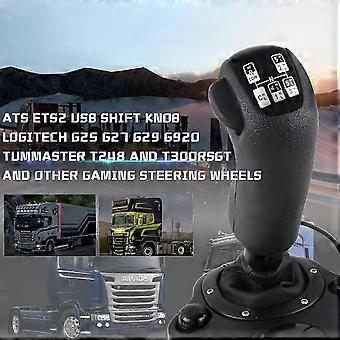
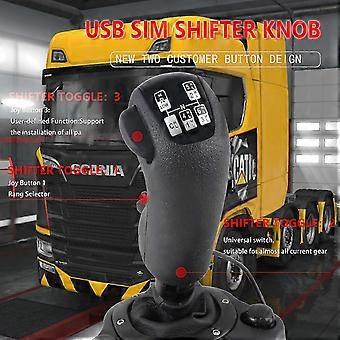
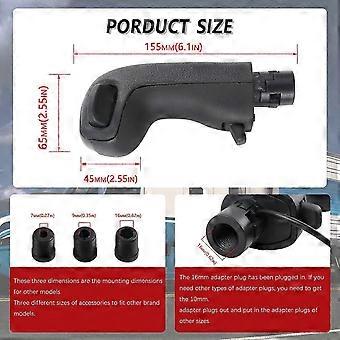
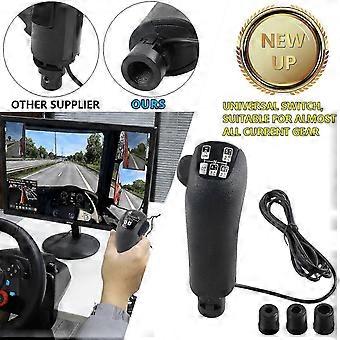
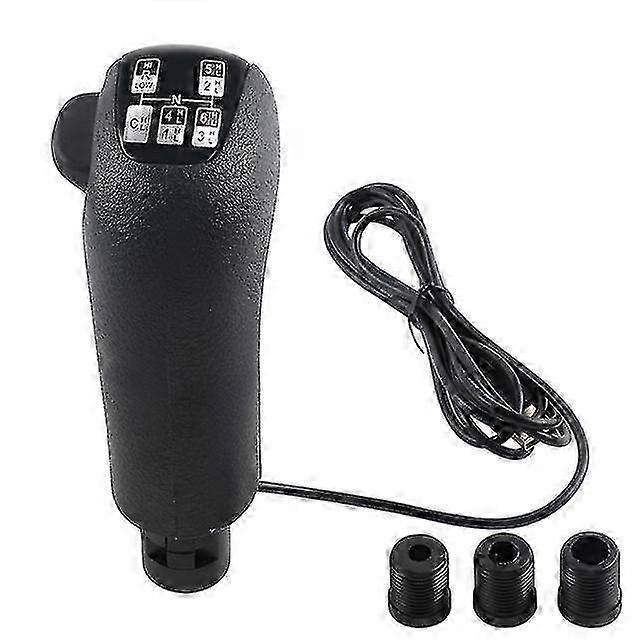
USB Shift Knob for Logitech G923 G29 G27 G25 TH8A for ETS2ATS Scania Truck High Low Gear Simulator Shifter simulators Fitment: Applicable to modified G25 / G27 / G29 / G920 H/TH8A THRUSTMASTER TH8A gear SUPPORTED GAMES: American Truck Simulator European Truck Simulator 2 and other simulators and games Feature: 100% brand new high quality high and low gear handball head, suitable for players who modify G25 / G27 / G29H/ TH8A gear ETS2 ATS, can use the switch to quickly switch between high and low gears, including two switchers, up to 18 gears. Independent USB cable, plug and play, easy to install, only supports PC windows system Setting: Open the ETS2 / ATS game settings: option Controls (KeyboardSelect add joystick controller name) Transmission H-Shifter Shifter layout (Eaton Fuller 10/13/18 speeds) Shifter Toggle:1 Joy Button 1Shifter Toggle:2 Joy Button 2 Shifter Toggle use Switch Mode Specification: Type: Shift Knob Color: Black Applicable: PC-USB Package Included: 1 x USB SIM Shifter Knob Installation manual Basic Settings First plug the device into the computer.After entering the game ,the following prompt will pop up,please click Ignore. Go to the Control menu and enable the Truck Gearshift Knob. Scroll down to H-shifter setup.When Clutch or throttle is selected for Shifter fast (advanced only),you can switch between Low/High gears by depressing the clutch or releasing the throttle. ETS 2 settings are as follows. ATS settings are as follows. Key binding Please turn the splitter and rang selector to the lower position first.Then find the shifter toggle in the controls menu. Click the Shifter Toggle:1,at this time,turn the rang selector to the upper position,and then dial it back to the lower position; Click the Shifter Toggle:2,at this time,turn the splitter to the upper position,and then dial it back to the lower position; Finally tick the Shifter Toggles use Switch Mode checkbox. Troubleshooting 1.Unable to bind key TODO: a.Check if the Truck Gearshift Knob device is enabled in the Control page of the game. b.Whether all devices enabled in the game are connected to the computer.Therefore,if the enabled devices have been connected to the computer but still cannot perform key binding,you can try to close other devices at this time(in the enabled device bar,check other enabled devices as None),and then perform key binding. 2.The state of the device is inconsistent with the state in the game TODO: Since these games are not supported by SDK and cannot know the state of the game.At this time only need to toggle the high and low speed switch/preselection valve can be.
  • Identifiant Fruugo: 436877471-915643002
  • EAN: 1367566178666

Livraison & retours

Expédition dans les 24 heures

  • STANDARD: 7.99 CHF - Livraison entre mar. 10 février 2026–mar. 17 février 2026

Expédition de Chine.

Nous mettons tout en œuvre pour que les produits que vous commandez vous soient livrés dans leur intégralité et selon vos indications. Néanmoins, si vous recevez une commande incomplète, des articles différents de ceux commandés ou si, pour toute autre raison, la commande ne vous satisfait pas, vous pouvez retourner la commande ou tout produit inclus dans celle-ci et recevoir un remboursement complet des articles. Voir l'intégralité de la politique de retour

Détails de conformité du produit

Veuillez consulter les informations de conformité spécifiques à ce produit décrites ci-dessous.

Les informations suivantes sont fournies par le détaillant tiers indépendant vendant ce produit.

Fabricant:
Les informations suivantes indiquent les coordonnées du fabricant du produit concerné vendu sur Fruugo.

  • Shenzhenyuandedianziyuouxiangongsi
  • Shenzhenyuandedianziyuouxiangongsi
  • Room 903, Building B, Nanxian Commercial Plaza, Nanyuan New Village
  • Hongshan Community, Minzhi Subdistrict, Longhua District
  • Longhua
  • Shenzhen
  • China
  • 518500
  • szrhkj21@163.com
  • 15819859068

Personne responsable dans l'UE:
Les informations suivantes indiquent les coordonnées de la personne responsable dans l'UE. La personne responsable est l'opérateur économique désigné basé dans l'UE qui est responsable des obligations de conformité relatives au produit concerné vendu dans l'Union européenne.

  • Huang Pengliang
  • FORCHAIN GmbH
  • Vilbeler Landstra?e73 60388 Frankfurt am Main
  • Frankfurt am Main
  • Frankfurt am Main
  • DE
  • 60388
  • nnicolesusan093@gmail.com
  • 1638127736