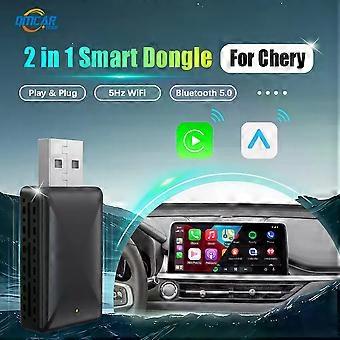
Android Auto Wireless Carplay Adapter 2in1 Smart Dongle Play&Plug For CheryArrizo 5Arrizo 7 Tiggo 3 Tiggo 3XTiggo 5XTiggo 2

37.95 CHF
+ 9.49 CHF Livraison

Android Auto Wireless Carplay Adapter 2in1 Smart Dongle Play&Plug For CheryArrizo 5Arrizo 7 Tiggo 3 Tiggo 3XTiggo 5XTiggo 2

  • Marque: Unbranded
Verkocht door:

Android Auto Wireless Carplay Adapter 2in1 Smart Dongle Play&Plug For CheryArrizo 5Arrizo 7 Tiggo 3 Tiggo 3XTiggo 5XTiggo 2

  • Marque: Unbranded

37.95 CHF

Économisez 36.05 CHF (48%)

Prix de vente recommandé

74.00 CHF
En stock
+ 9.49 CHF Livraison

Politique de retour sur 14 jours

Verkocht door:

37.95 CHF

Économisez 36.05 CHF (48%)

Prix de vente recommandé

74.00 CHF
En stock
+ 9.49 CHF Livraison

Politique de retour sur 14 jours

Modes de paiement:

Description

Android Auto Wireless Carplay Adapter 2in1 Smart Dongle Play&Plug For CheryArrizo 5Arrizo 7 Tiggo 3 Tiggo 3XTiggo 5XTiggo 2

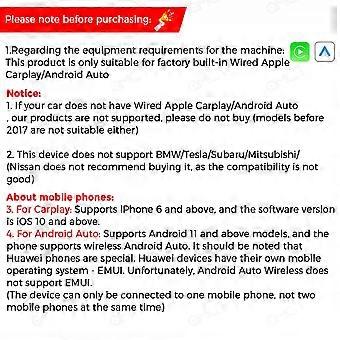
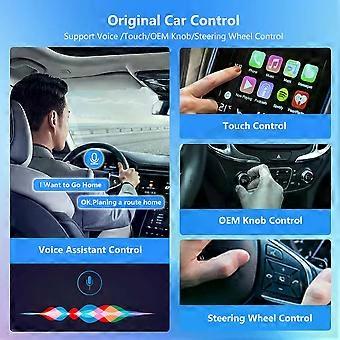
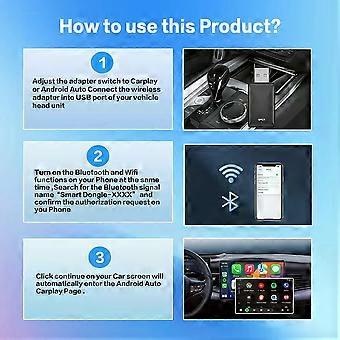
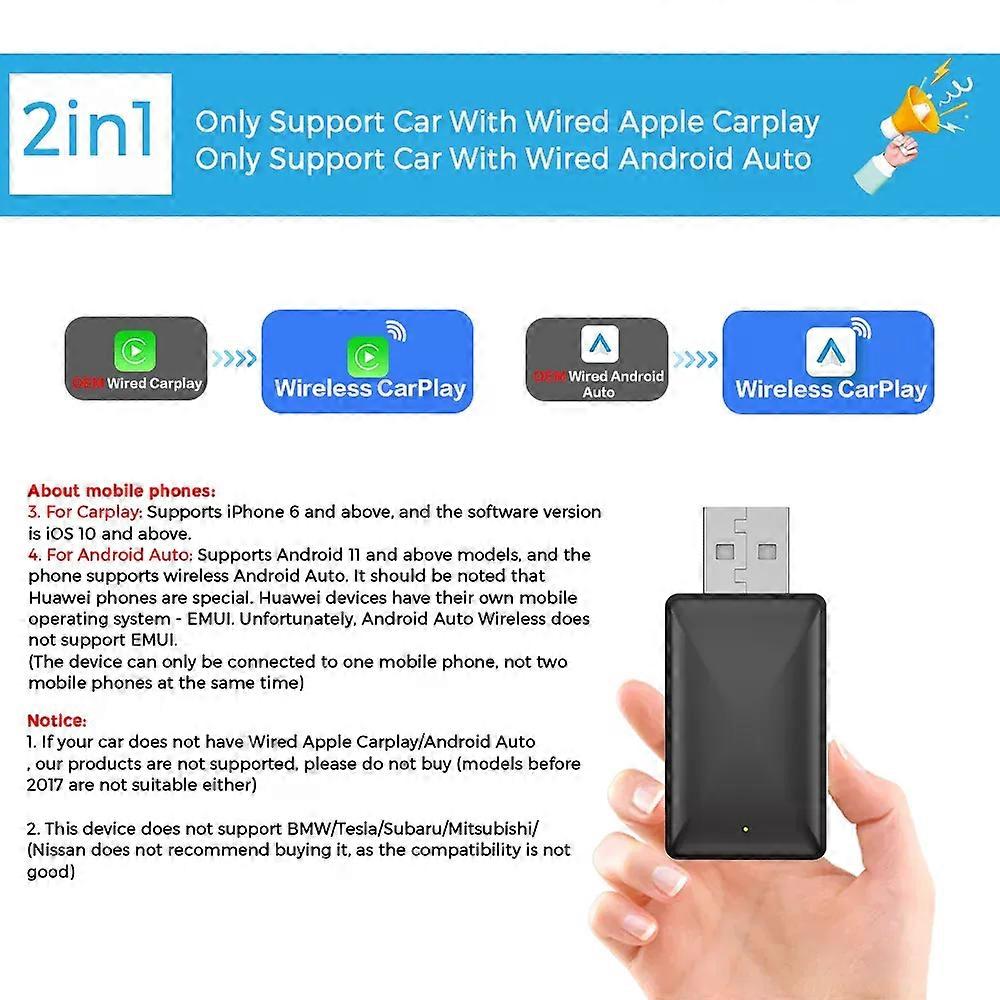
Specifications Origin:Mainland China Brand Name:QMCARTRADE Conditions of Use:Only Support Original Car With Wired Carplay/Android Auto Blunetooth:5.0 Wifi:2.4G+5G Feature:Wireless Carplay,Wireless Android Auto,Fota Update,Plug and play,wireless android auto adapter,carplay adapter,android auto wireless usb dongle,carplay android Conditions of Use "1.This product is only support OEM Car With Wired Apple Carplay/Android Auto 2.. No Wired Wired Carplay/Android Auto is no support /please dont't buy 3.This device does not support BMW/Tesla/Subaru/Mitsubishi/ (Nissan does not recommend buying it, as the compatibility is not good)" About mobile phones: "1. For Carplay: Supports iPhone 6 and above, and the software version is iOS 10 and above. 2.For Android Auto: Supports Android 11 and above models, and the phone supports wireless Android Auto. 3.It should be noted that Huawei phones are special. Huawei devices have their own mobile operating system - EMUI. Unfortunately, Android Auto Wireless does not support EMU" Functions to switch between each other "If you need to switch from wireless Carplay to wireless Android Auto functionality Please use your Android phone to connect the Bluetooth name of the device. After the connection is successful, wait for the device to automatically reset and restart. The process will take about 30 seconds. Keep it powered on. Carplay will switch to Android Auto functionality This way you can use your Android phone to connect to the wireless Android Auto feature" Product main functions "1.Wired Apple Carplay to Wireless Apple CarPlay 2.Wired Android Auto to Wireless Android Auto" How to use wireless Carplay? "1. Connect the USB box to the car USB 2. Check the Bluetooth name ""Smart Dongle-XXXX"" that appears on the car 3. Turn on your phone's WIFI and Bluetooth, and use Bluetooth to pair the device name." How to use wireless Android Auto? "1. Connect the USB box to the car USB 2. Check the Bluetooth name ""Smart Dongle-XXXX"" that appears on the car 3. Turn on your phone's WIFI and Bluetooth, and use Bluetooth to pair the device name." About OTA upgrade In order to bring you a better experience, this product supports OTA online upgrade function. When the Wireless Carplay Adapter cannot be used normally or performance problems occur after upgrading the system of the mobile phone, it is recommended to upgrade the Wireless Carplay Adapter to the latest version. If the Wireless Carplay Adapter is working properly, it is usually not recommended to upgrade the firmware. How to upgrade for iphone online? "For iphone access backend page 1. Please use your mobile phone to connect to the device Wifi: ""Smart Dongle"" and enter the password: ""12345678"". 2. Open the Safari browser on your iPhone and enter the IP address: ""192.168.1.101, 3. Click ""Visit"" or ""Go"" to enter the online upgrade background interface. (If you cannot enter, please check whether your phone's Wifi is correctly connected to the device)" How to upgrade for Andorid phone online? "Android phone accessing the background page 1. Please use your mobile phone to connect to the device Wifi: ""Smart Dongle"" and enter the password: ""12345678"" 2. Open the Chrome browser on your Phone and enter the IP address: 192.168.1.101 3. Click ""Visit"" or ""Go"" to enter the online upgrade background interface. (If you cannot enter, please check whether the Wifi of your mobile phone is correctly connected to the device)" If the original car has wired Carplay/Android, why cant it be connected? "1. Please use your mobile phone to delete the Bluetooth device name of the original car 2. Restore factory equipment (Because the device is Bluetooth-only, if the Bluetooth of the original car is connected to the mobile phone, the mobile phone cannot connect to the Bluetooth of the device)" After pairing the Android Auto adapter, the Android Auto feature cannot be launched or the USB is not compatible/recognized. "1.Please check if the iphone/Android smartphone's Bluetooth connect toother devices such as Earphone, watch.....lf so, please disconnect otherauto-connected Bluetooth devices,and android smartphone alsoneed toconnect to the vehicle Bluetooth for android auto. 2.When on a call, check that your ""o"" output option is Carplay/AndroicAuto." The adapter light remains on after the car is turned off. Because the car does not cut off all power immediately when it is turned offthe adapter's light will not go out immediately,but it will take a while. Pleaserest assured that its power consumption is minimal and will not drain the calbattery. Can the phone use other network wifi when using wireless android auto adapter? When enjoying the wireless android auto adapter function,the phone's WiFi will be occupied by the adapter, So you can not use other internet at thesame time,You only can use
  • Identifiant Fruugo: 441209372-926002406
  • EAN: 692034793807

Informations sur la sécurité des produits

Veuillez consulter les informations de sécurité du produit spécifiques à ce produit décrites ci-dessous.

Les informations suivantes sont fournies par le détaillant tiers indépendant vendant ce produit.

Étiquettes de sécurité des produits

CE Mark
Numéro de pièce du fabricant: 692034793807
Numéro de modèle: 692034793807
Numéro de série: 692034793807
Numéro de lot: 692034793807

Livraison & retours

Expédition dans un délai de 3 jours

  • STANDARD: 9.49 CHF - Livraison entre mar. 27 janvier 2026–mer. 04 février 2026

Expédition de Chine.

Nous mettons tout en œuvre pour que les produits que vous commandez vous soient livrés dans leur intégralité et selon vos indications. Néanmoins, si vous recevez une commande incomplète, des articles différents de ceux commandés ou si, pour toute autre raison, la commande ne vous satisfait pas, vous pouvez retourner la commande ou tout produit inclus dans celle-ci et recevoir un remboursement complet des articles. Voir l'intégralité de la politique de retour

Détails de conformité du produit

Veuillez consulter les informations de conformité spécifiques à ce produit décrites ci-dessous.

Les informations suivantes sont fournies par le détaillant tiers indépendant vendant ce produit.

Fabricant:
Les informations suivantes indiquent les coordonnées du fabricant du produit concerné vendu sur Fruugo.

  • Shenzhen Huahuiyu Technology Co., Ltd.
  • Shenzhen Huahuiyu Technology Co., Ltd.
  • Room 511, Xiaren Yongsheng Building, Shangcun Community, Gongming Street, Guangming District
  • Shenzhen
  • China
  • 518000
  • huahuiyu2023@163.com
  • 86-15818330429

Personne responsable dans l'UE:
Les informations suivantes indiquent les coordonnées de la personne responsable dans l'UE. La personne responsable est l'opérateur économique désigné basé dans l'UE qui est responsable des obligations de conformité relatives au produit concerné vendu dans l'Union européenne.

  • E-CrossStu GmbH
  • E-CrossStu GmbH
  • Mainzer Landstr.69, 60329 Frankfurt am Main, Hessen, Deutschland
  • Frankfurt am Main, Hessen
  • Germany
  • 60329
  • E-crossstu@web.de
  • +49 69332967674