HDMI Digital Audio Extractor, 192KHz DAC Converter, ARC Compatible Output Electronic Accessory

40.95 CHF
+ 17.99 CHF Livraison

HDMI Digital Audio Extractor, 192KHz DAC Converter, ARC Compatible Output Electronic Accessory
Vendu par:

40.95 CHF

Économisez 18.05 CHF (30%)

Prix de vente recommandé

59.00 CHF
En stock
+ 17.99 CHF Livraison

Retours sous 14 jours

Modes de paiement:

  • Marque: unbrand

Détails du produit

Détails du produit

HDMI Digital Audio Extractor, 192KHz DAC Converter, ARC Compatible Output Electronic Accessory
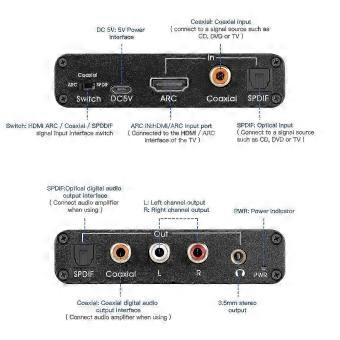
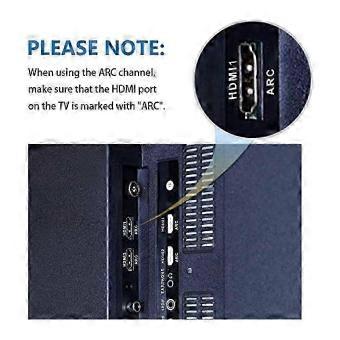
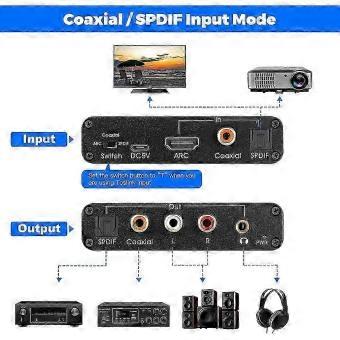
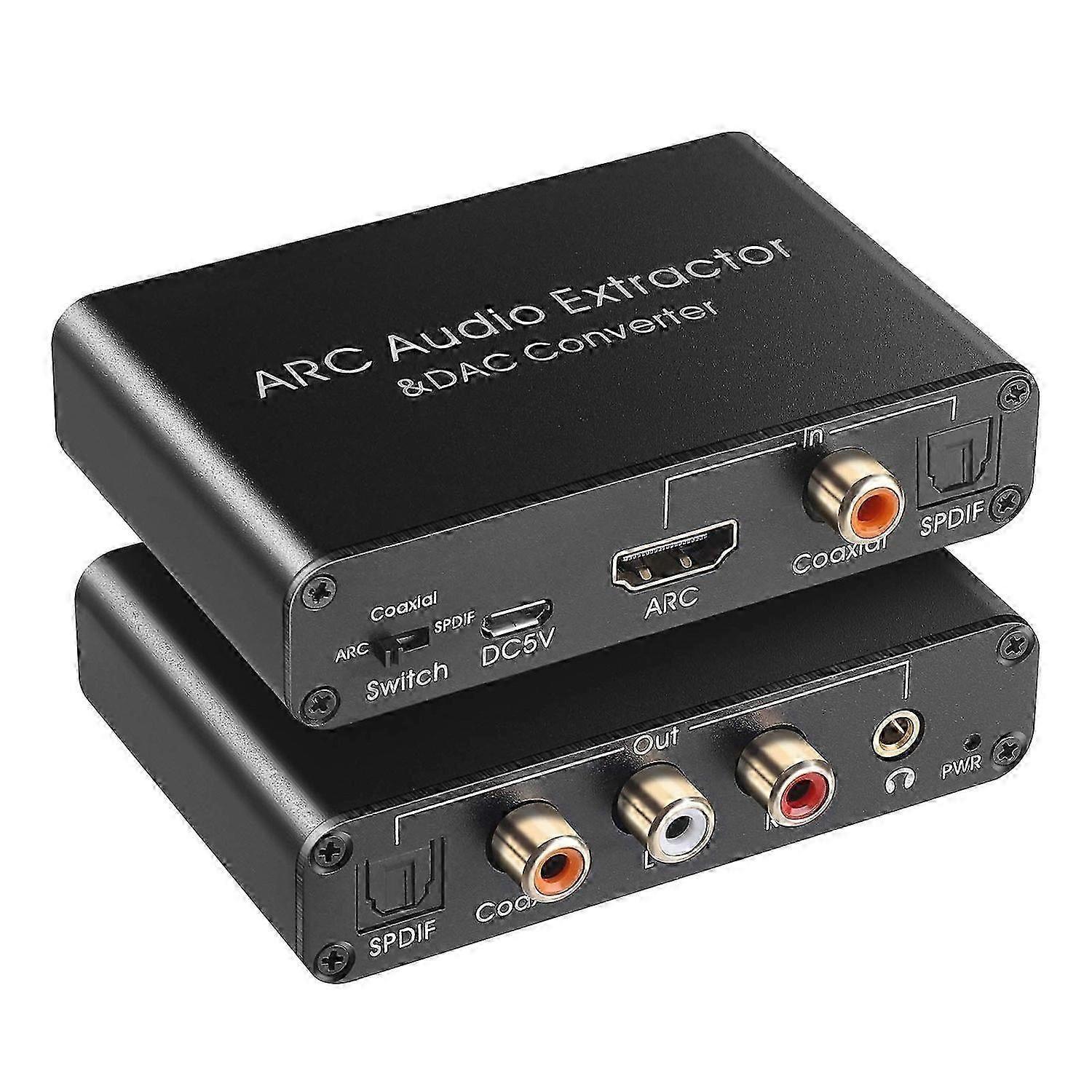
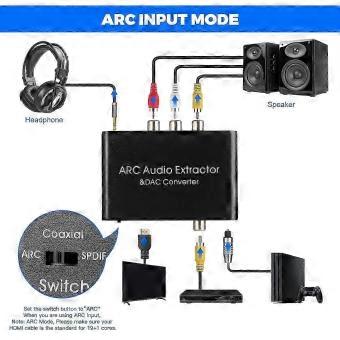
[HDMI ARC Audio Extractor]Audio Return Channel function and audio extract to digital and analog signal.That means, when connected to HDMI ARC device,such as your TV with HDMI ARC port,audio will be return from TV and output to SPDIF,Coaxial,L+R RCA,3.5mm;Note: Please set your TV audio output to PCM, LPCM [192KHz DAC Digital to Analog Converter]Input SPDIF or Coaxial Digital signal,Output to L+R Analog Audio,3.5mm Jack stereo sound;Note: Please set your TV audio output to PCM, LPCM [HDMI ARC CEC Volume Adjustable]When switch to HDMI ARC mode, volume can be countrolled by TV's remote controller (Attention: CEC is only for HDMI 1.4 version or ab ove,both of your device and HDMI cable must be required,Don't forget to set the CEC control configurations of your TV,or else not available for volume control) [SPDIF to Coaxial Bidirection Converter]SPDIF (Toslink/Optical) convert to Coaxial, Coaxial convert to SPDIF(Toslink/Optical); [Mini Size and Easy to Use]Aluminum shell,Small size,portable,compatible with for Blu-ray DVD,HDTV,TV,TV Box,Game playstation PS2,PS3,PS4,Xbox Style: HDMI ARC Audio Extractor Audio format: PCM Audio Sampling rate: 192Khz Mode choice: ARC, coaxial, optical Size:4 x 2.4 x 0.8 inches Setting Method: Please Set the Audio Output to PCM or LPCM before Using; Connection and Operation: 1. Connect the HDMI port of the adapter to the HDMI (ARC) port of the TV through the HDMI cable 2. Connect the converter's optical fiber and coaxial input port with the corresponding audio interface of DVD or PS3 through optical fiber cable or coaxial cable 3. Connect to the amplifier system through optical fiber cable, coaxial cable or RCA cable and 3.5mm audio cable 4. Connect the USB power cord to the Micro-USB interface of the converter 5. Switch to the corresponding audio by flipping the switch Material:Aluminum alloy colour:black PackageContents: 1 *
  • Identifiant Fruugo: 554246890-1120882479
  • EAN: 9050165561473
Sécurité

Informations sur la sécurité des produits

Veuillez consulter les informations de sécurité du produit spécifiques à ce produit décrites ci-dessous.

Les informations suivantes sont fournies par le détaillant tiers indépendant vendant ce produit.

Étiquettes de sécurité des produits

CE Mark
Avertissements de sécurité: Important Safety Instructions Read Before Use: Please read all instructions and safety warnings before using this product. Failure to follow these guidelines may result in injury, damage, or malfunction. General Warnings Intended Use: Use this product only for its intended purpose as described in the user manual. Supervision Required: This product is not intended for use by children or persons with reduced physical, sensory, or mental capabilities without supervision. Inspection Before Use: Check for any signs of damage or wear before use. Do not use if damaged.

Livraison

Livraison

Expédié sous 24 h

  • STANDARD: 17.99 CHF - Livraison entre mer. 18 novembre 2026–mar. 24 novembre 2026

Expédié depuis le Chine.

Retours

Retours

Nous mettons tout en œuvre pour que les produits que vous commandez vous soient livrés dans leur intégralité et conformément à votre commande. Néanmoins, si vous recevez une commande incomplète, des articles différents de ceux commandés ou si, pour toute autre raison, la commande ne vous satisfait pas, vous pouvez retourner la commande ou tout produit inclus dans celle-ci et obtenir le remboursement intégral des articles retournés.

Consulter la politique de retour complète